Overview
Proper SMTP configuration is critical for successful phishing campaigns. This tutorial covers setup for popular email service providers including Amazon SES, SendGrid, and custom SMTP servers. You'll also learn how to configure SPF, DKIM, and DMARC records to ensure deliverability and avoid spam filters.
What You'll Learn
- SMTP basics and authentication methods
- Amazon SES configuration and verification
- SendGrid setup and API key management
- Custom SMTP server integration
- SPF, DKIM, and DMARC DNS configuration
- Troubleshooting delivery issues
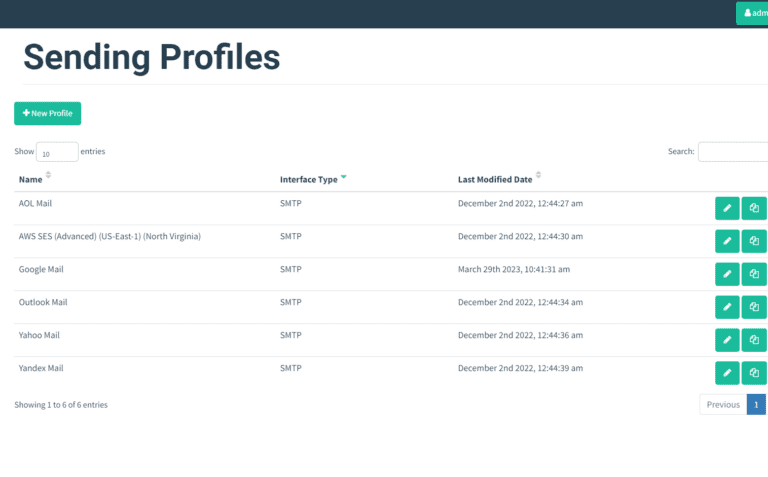
GoPhish Sending Profiles - SMTP Configuration Interface
SMTP Basics
SMTP (Simple Mail Transfer Protocol) is the standard protocol for sending emails. GoPhish requires SMTP credentials to deliver phishing simulation emails to your targets.
Required SMTP Information
| Field | Description | Example |
|---|---|---|
| Host | SMTP server address and port | smtp.gmail.com:587 |
| Username | SMTP authentication username | AKIAIOSFODNN7EXAMPLE |
| Password | SMTP password or API key | wJalrXUtnFEMI/K7MDENG |
| From Address | Sender email address | security@company.com |
Option 1: Amazon SES Configuration
Amazon Simple Email Service (SES) is a cost-effective, scalable email service. It's ideal for high-volume campaigns and integrates seamlessly with AWS infrastructure.
Step 1: Verify Your Domain in SES
- Log into AWS Console and navigate to Amazon SES
- Go to "Verified identities" → "Create identity"
- Select "Domain" and enter your domain (e.g., company.com)
- Enable DKIM signing (recommended)
- Click "Create identity"
# Using AWS CLI to verify domain
aws ses verify-domain-identity --domain company.com

# Response includes verification token
{
  "VerificationToken": "abc123def456..."
}
Step 2: Add DNS Records
Add the verification records to your domain's DNS configuration:
# Domain Verification TXT Record
_amazonses.company.com TXT "abc123def456..."

# DKIM Records (3 CNAME records provided by SES)
token1._domainkey.company.com CNAME token1.dkim.amazonses.com
token2._domainkey.company.com CNAME token2.dkim.amazonses.com
token3._domainkey.company.com CNAME token3.dkim.amazonses.com
Step 3: Request Production Access
Important: New SES accounts start in "Sandbox Mode" with strict limits. You can only send to verified email addresses and are limited to 200 emails per day. Request production access to remove these restrictions.
- In SES console, click "Account dashboard" → "Request production access"
- Select "Transactional" as mail type
- Describe your use case (security awareness training)
- Provide compliance contact information
- Submit request (typically approved within 24 hours)
Step 4: Create SMTP Credentials
# Generate SMTP credentials in SES Console
# Navigate to: SMTP settings → Create SMTP credentials

# You'll receive:
SMTP Username: AKIAIOSFODNN7EXAMPLE
SMTP Password: wJalrXUtnFEMI/K7MDENG/bPxRfiCYEXAMPLEKEY

# SMTP Endpoint (varies by region)
# US East (N. Virginia):  email-smtp.us-east-1.amazonaws.com
# US West (Oregon):       email-smtp.us-west-2.amazonaws.com
# EU (Ireland):           email-smtp.eu-west-1.amazonaws.com
Step 5: Configure in GoPhish
POST /api/smtp/
Authorization: Bearer YOUR_API_KEY
Content-Type: application/json

{
  "name": "Amazon SES - Production",
  "host": "email-smtp.us-east-1.amazonaws.com:587",
  "username": "AKIAIOSFODNN7EXAMPLE",
  "password": "wJalrXUtnFEMI/K7MDENG/bPxRfiCYEXAMPLEKEY",
  "from_address": "security@company.com",
  "ignore_cert_errors": false,
  "headers": [
    {
      "key": "X-SES-CONFIGURATION-SET",
      "value": "gophish-tracking"
    }
  ]
}
Option 2: SendGrid Configuration
SendGrid is a popular email delivery platform with excellent deliverability rates and detailed analytics.
Step 1: Create SendGrid Account
- Sign up at sendgrid.com (free tier allows 100 emails/day)
- Complete sender verification process
- Navigate to Settings → Sender Authentication
- Click "Authenticate Your Domain"
Step 2: Authenticate Your Domain
# SendGrid will provide DNS records to add:

# CNAME Records for DKIM
s1._domainkey.company.com CNAME s1.domainkey.u12345.wl.sendgrid.net
s2._domainkey.company.com CNAME s2.domainkey.u12345.wl.sendgrid.net

# CNAME for link branding (optional)
email.company.com CNAME u12345.wl.sendgrid.net
Step 3: Create API Key
- Go to Settings → API Keys
- Click "Create API Key"
- Name it "GoPhish SMTP"
- Select "Full Access" or "Restricted Access" with Mail Send permission
- Copy and save the API key (shown only once)
Step 4: Configure in GoPhish
POST /api/smtp/
Authorization: Bearer YOUR_API_KEY

{
  "name": "SendGrid - Production",
  "host": "smtp.sendgrid.net:587",
  "username": "apikey",
  "password": "SG.abcdef123456789...",
  "from_address": "security@company.com",
  "ignore_cert_errors": false
}

# Note: Username is literally "apikey" - the API key goes in password field
Option 3: Custom SMTP Server
You can use your organization's existing mail server, but ensure it supports TLS and has proper authentication.
Common SMTP Providers
| Provider | SMTP Server | Port |
|---|---|---|
| Gmail | smtp.gmail.com | 587 (TLS) |
| Microsoft 365 | smtp.office365.com | 587 (TLS) |
| Mailgun | smtp.mailgun.org | 587 (TLS) |
| Postmark | smtp.postmarkapp.com | 587 (TLS) |
# Microsoft 365 Example
{
  "name": "Office 365 SMTP",
  "host": "smtp.office365.com:587",
  "username": "admin@company.com",
  "password": "YourPassword123",
  "from_address": "security@company.com",
  "ignore_cert_errors": false
}
DNS Configuration: SPF, DKIM, DMARC
Proper DNS authentication records are essential for email deliverability. These records prove your emails are legitimate and prevent spoofing.
SPF (Sender Policy Framework)
SPF specifies which mail servers are authorized to send email for your domain.
# SPF Record for Amazon SES
company.com TXT "v=spf1 include:amazonses.com ~all"

# SPF Record for SendGrid
company.com TXT "v=spf1 include:sendgrid.net ~all"

# SPF Record for Multiple Providers
company.com TXT "v=spf1 include:amazonses.com include:sendgrid.net ~all"

# SPF Record with your mail server
company.com TXT "v=spf1 include:amazonses.com ip4:203.0.113.0/24 ~all"
DKIM (DomainKeys Identified Mail)
DKIM adds a digital signature to your emails, verifying they haven't been modified in transit.
# DKIM records are provided by your email service provider
# Amazon SES provides 3 CNAME records
# SendGrid provides 2 CNAME records
# Add these exactly as provided by your ESP
DMARC (Domain-based Message Authentication)
DMARC tells receiving servers what to do with emails that fail SPF or DKIM checks.
# Basic DMARC Record (monitoring only)
_dmarc.company.com TXT "v=DMARC1; p=none; rua=mailto:dmarc@company.com"

# Quarantine Policy (recommended for production)
_dmarc.company.com TXT "v=DMARC1; p=quarantine; pct=100; rua=mailto:dmarc@company.com"

# Reject Policy (strictest - use after testing)
_dmarc.company.com TXT "v=DMARC1; p=reject; pct=100; rua=mailto:dmarc@company.com; ruf=mailto:forensics@company.com"

# DMARC Parameters:
# p=none       - Monitor only, don't take action
# p=quarantine - Mark as spam if authentication fails
# p=reject     - Reject emails that fail authentication
# pct=100      - Apply policy to 100% of messages
# rua          - Aggregate report email address
# ruf          - Forensic report email address
Testing SMTP Configuration
Always test your SMTP configuration before launching campaigns.
Via GoPhish Dashboard
- Navigate to "Sending Profiles"
- Select your SMTP profile
- Click "Send Test Email"
- Enter your email address
- Check inbox and spam folder
# Test SMTP from command line
openssl s_client -starttls smtp -connect email-smtp.us-east-1.amazonaws.com:587

# You should see successful TLS connection
# Then test authentication:
AUTH LOGIN
# Enter base64 encoded username
# Enter base64 encoded password

# Verify DNS records
dig TXT company.com       # Check SPF
dig TXT _dmarc.company.com # Check DMARC
dig CNAME s1._domainkey.company.com # Check DKIM
Troubleshooting Delivery Issues
Common Problems and Solutions
Problem: Authentication Failed
- Verify username and password are correct
- Check if account requires app-specific password (Gmail)
- Ensure SMTP credentials haven't expired
- Verify IP isn't blocked by provider
Problem: Emails Going to Spam
- Add SPF, DKIM, and DMARC DNS records
- Warm up your sending domain gradually
- Improve email content (avoid spam trigger words)
- Use a dedicated IP address for sending
- Monitor sender reputation with tools like SenderScore
Problem: Connection Timeout
- Check firewall rules allow outbound port 587/465/25
- Verify SMTP server address and port are correct
- Try alternative ports (587, 465, 2525)
- Check if your IP is on a blacklist
Problem: Rate Limiting
- Check your provider's sending limits
- Upgrade to higher tier if needed
- Reduce campaign send rate in GoPhish
- Split large campaigns across multiple days
Best Practices
SMTP Configuration Tips
- Use TLS/SSL encryption (port 587 or 465) - never send unencrypted
- Create dedicated sending profiles for different campaign types
- Monitor bounce rates and adjust sending practices
- Keep SMTP credentials secure - use environment variables or secrets manager
- Set up DMARC reports to monitor authentication failures
- Test thoroughly before launching large campaigns
- Maintain sender reputation by avoiding spam complaints
- Use dedicated domains for phishing simulations (e.g., training.company.com)
Cost Comparison
| Provider | Free Tier | Paid Pricing |
|---|---|---|
| Amazon SES | 62,000/month (from EC2) | $0.10 per 1,000 emails |
| SendGrid | 100/day forever | $15/month for 50k emails |
| Mailgun | 5,000/month for 3 months | $35/month for 50k emails |
| Postmark | 100 emails (trial) | $15/month for 10k emails |
Next Steps
Create Your First Campaign
Now that SMTP is configured, launch your first phishing simulation.
View Tutorial →Email Template Best Practices
Design effective templates that pass spam filters and test awareness.
View Tutorial →Need SMTP Help?
Having trouble with email delivery? Our support team can help troubleshoot SMTP issues.
Contact Support